
The most downloaded open Jev model at 20B+, and top-ranked in an independent benchmark.
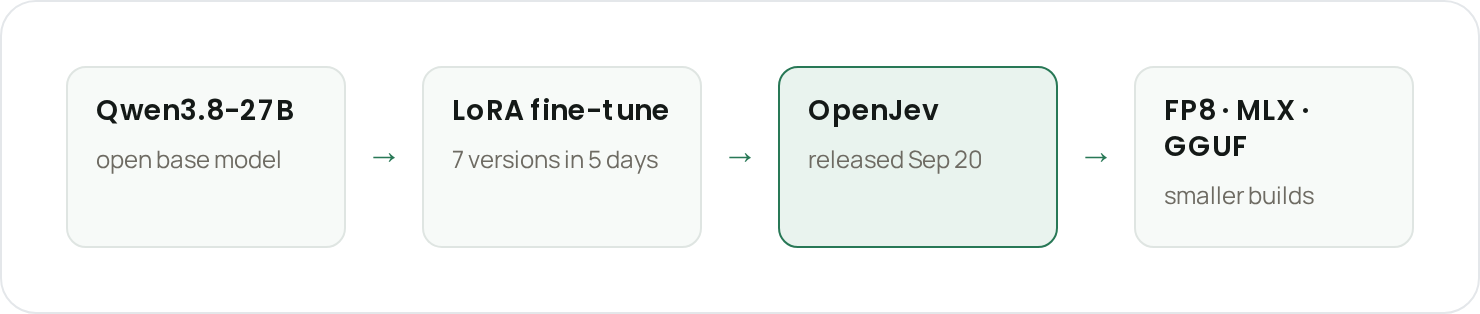
Loop builds agentic coworkers for restaurants. Many of the steps they take come down to choosing between answers the application already knows, such as which ledger account a bank line belongs to, which metric a question is about, or whether a chart uses the approved definition. In September, TypeSafe's Jev showed that a model can make those choices much faster and far more efficiently than a chat model, by scoring every option in one forward pass. We wanted the same thing as open weights we could run next to our customers' data and tune on our own tasks. So we fine-tuned Alibaba's open Qwen3.8-27B model into OpenJev and released it on September 20, five days after Jev launched.
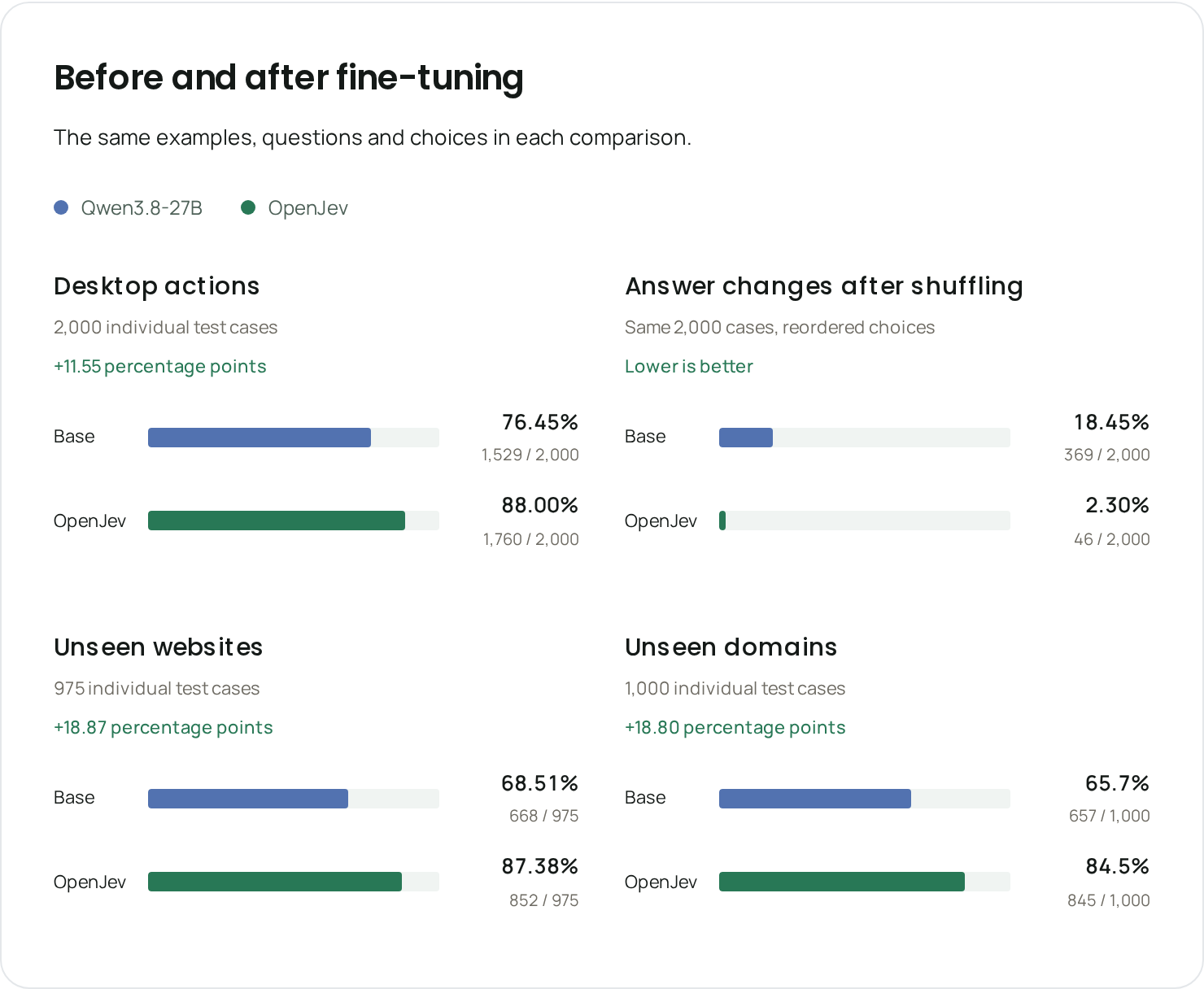
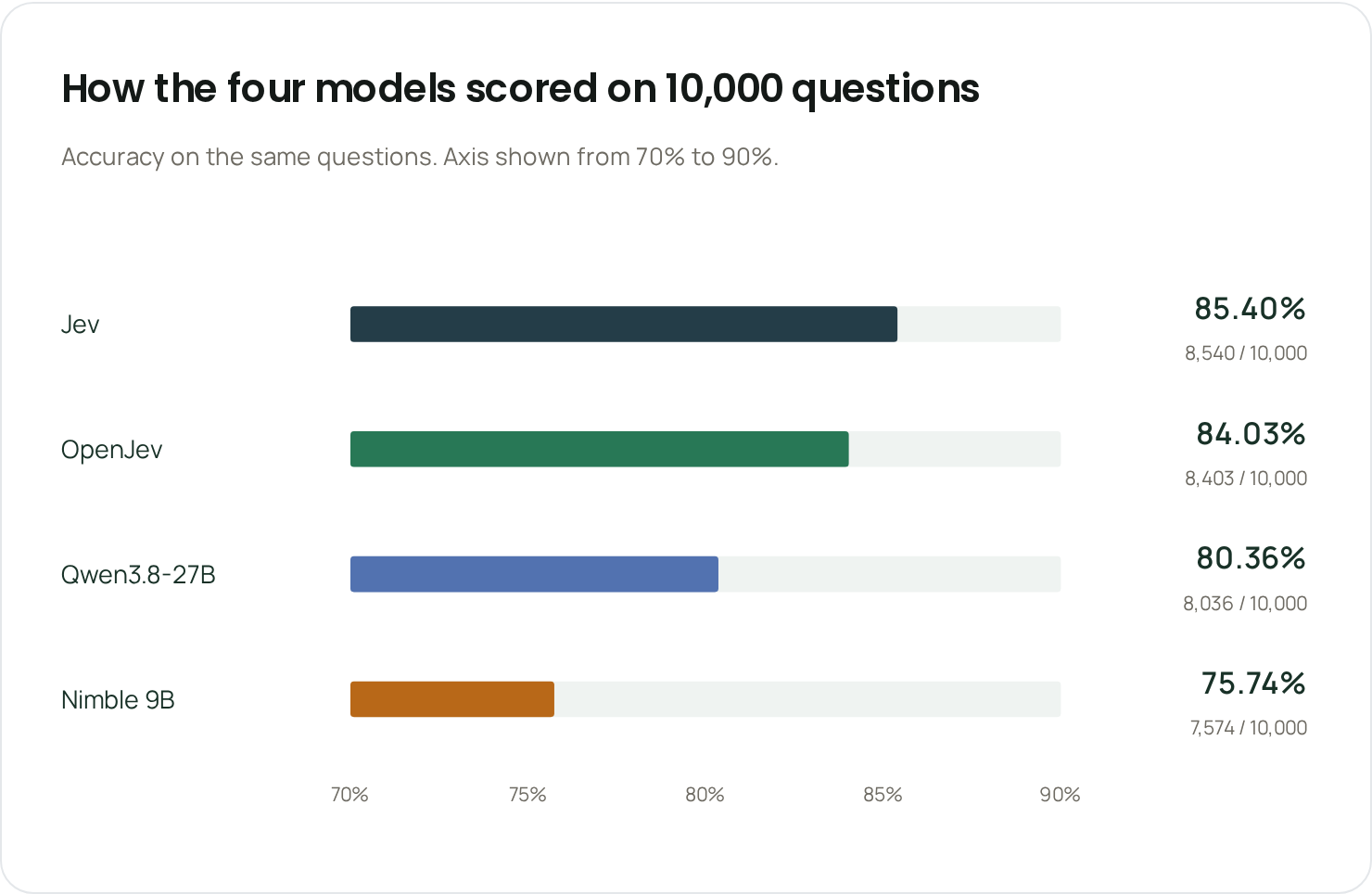
OpenJev scores 84.0% on 10,000 public classification questions, against 85.4% for Jev. On 975 steps from websites it never saw in training, it reads the screenshot and picks the right next action 87.4% of the time. That's up from 68.5% for the same model before fine-tuning, and well ahead of Jev, which reads only page text and gets 51.9%.
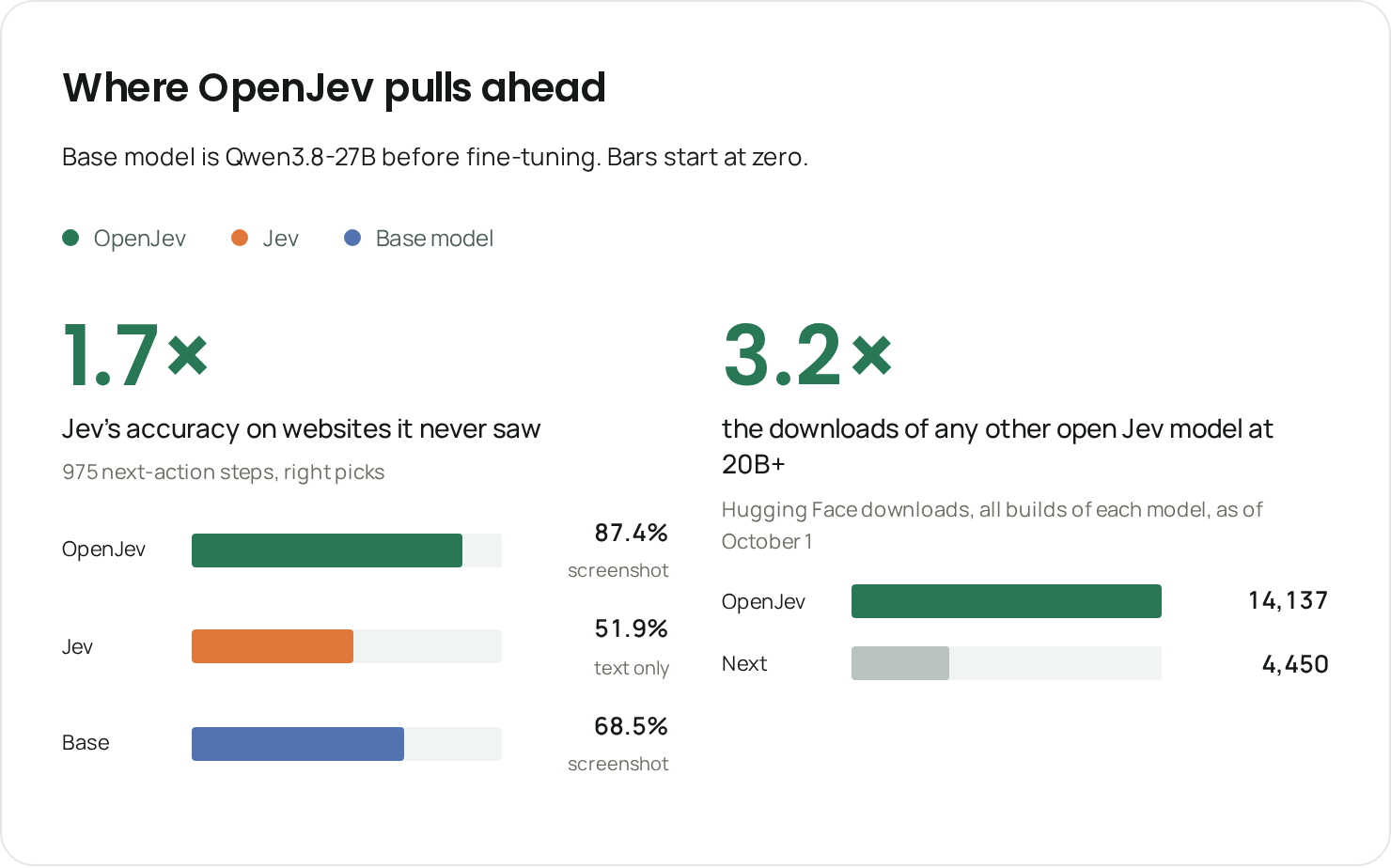
In its first 11 days OpenJev was downloaded more than 14,000 times, over three times any other open Jev model at 20B parameters and above.
What is a decision model?
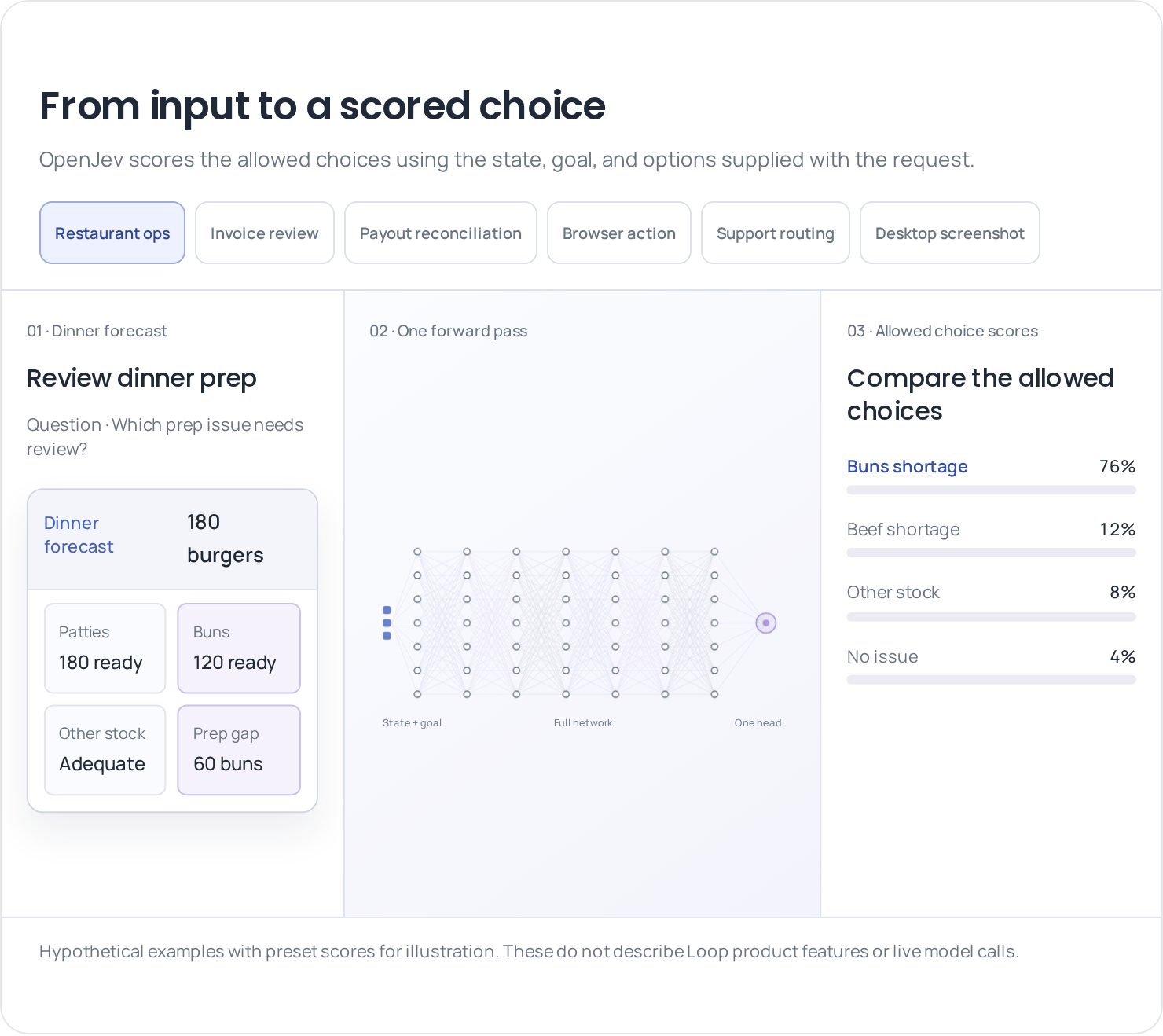
A chat model writes its answer one token at a time, and the app has to parse it. A decision model reads the request and the allowed answers once, then returns a probability for each option, without writing any text.
That makes it fast and cheap. OpenJev answers in under 200 ms on one H100, at about 3 cents per 1,000 short decisions. The answer is always one of your options, with a probability attached.
Why decision models at Loop
24 sample messages each get a team, an urgency score and a review flag: 72 decisions in 6.4 seconds, four requests at a time. Fictional restaurant, live model calls, normal speed.
Reconciliation
Matching a bank line to a ledger account, or a GL account to a P&L line. Each line is one call that returns the account and a probability in under 200 ms, so a full month of statements matches in minutes. For a bank line from a food supplier, the answer looks like this:
| Ledger account | Probability |
|---|---|
| Food cost | 0.91 |
| Packaging | 0.06 |
| Repairs | 0.02 |
| Other expense | 0.01 |
Food cost wins at 0.91, from a single call with no text to parse.
Memory
Picking which saved notes apply to the current conversation. Only the relevant notes reach the main model, which keeps its prompt short.
Semantic layer
Restaurant teams use Loop as their business analyst, so every answer has to come from the right metric. A decision model ranks which metrics and skills fit the question and puts the right ones in front of the agent, in 0.4 s for about $0.002 a turn.
OpenJev picks the component, layout, metric and filter, and the app renders it. Two requests rendered in 0.91 and 0.88 seconds. Sample records, live model calls.
Validation and judges
Loop also checks its own work. A saved chart has to use the approved definition of every metric it shows. A check that took a frontier chat model 20 s takes 0.4 s at one to two orders of magnitude lower cost, so it runs on every save.
Why fine-tune
Vision
Jev reads text only. Our agents also work in browsers and on dashboards, where much of what matters is on screen, such as which filter is selected or whether the page finished loading. OpenJev also reads screenshots.
Better accuracy and control on our own tasks
With our own weights, we can train on the decisions our agents make and measure the result on our own cases. The model only changes when we decide to change it.
How we built it
Starting point
We started from Qwen3.8-27B, the base model in the results below. It already reads screenshots and follows instructions well, so training only had to teach it to return a pick and a probability for each option. We fine-tuned with LoRA, a small set of added weights trained on top of the base model, and merged them into the released model.
Training data
We trained on public datasets of web and desktop agent steps, each with a screenshot, the page text and the action a person took, plus public classification tasks covering the text decisions our agents make. We moved the correct answer around the option list during training, so the model picks by what each option says, not where it sits in the list. We trained seven versions in five days and released the best one.
Smaller builds
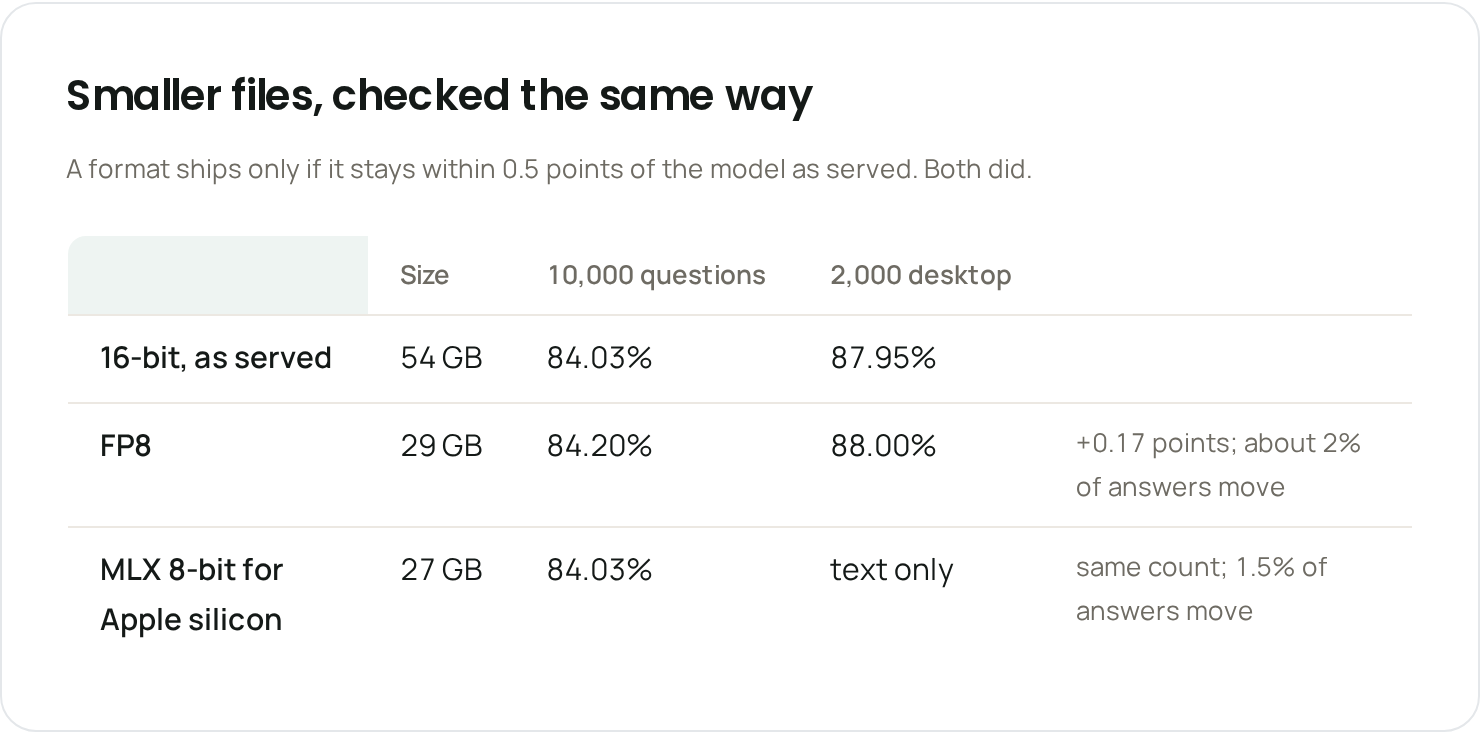
FP8 runs on a single H100, MLX on Apple silicon, and GGUF on llama.cpp. We checked FP8 and the 8-bit MLX build against the full model on the same questions, and set the bar before measuring: a drop-in replacement stays within 0.5 points. FP8 scored 84.20% against 84.03% on the 10,000 questions, and the 8-bit MLX build matched the full model exactly.
Results
Training & Performance
Both models got the same inputs, so the only difference is the fine-tuning.
| Test | Before fine-tuning | OpenJev |
|---|---|---|
| Desktop actions (2,000 steps) | 76.5% | 88.0% |
| Unseen websites (975 steps) | 68.5% | 87.4% |
| Unseen domains (1,000 steps) | 65.7% | 84.5% |
| Reasoning (7 sets of 200 questions) | 52.4% | 74.7% |
| Answer changes when options are shuffled (lower is better) | 18.5% | 2.3% |
Benchmarking
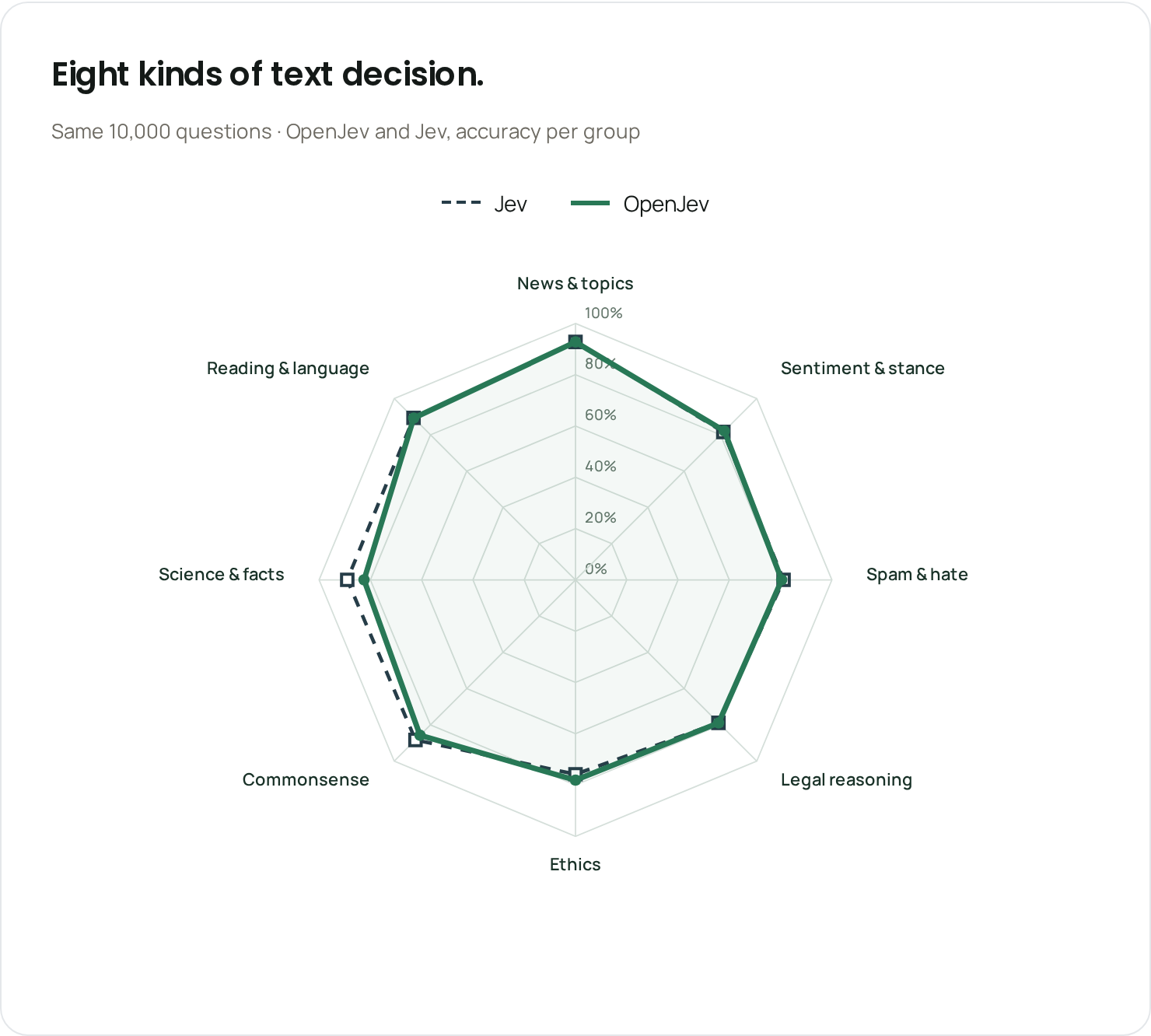
We took 10,000 text questions from 34 public datasets, in eight groups (news and topics, sentiment and stance, spam and hate, legal reasoning, ethics, commonsense, science and facts, reading and language), and gave every model the same context, instructions, options and option order.
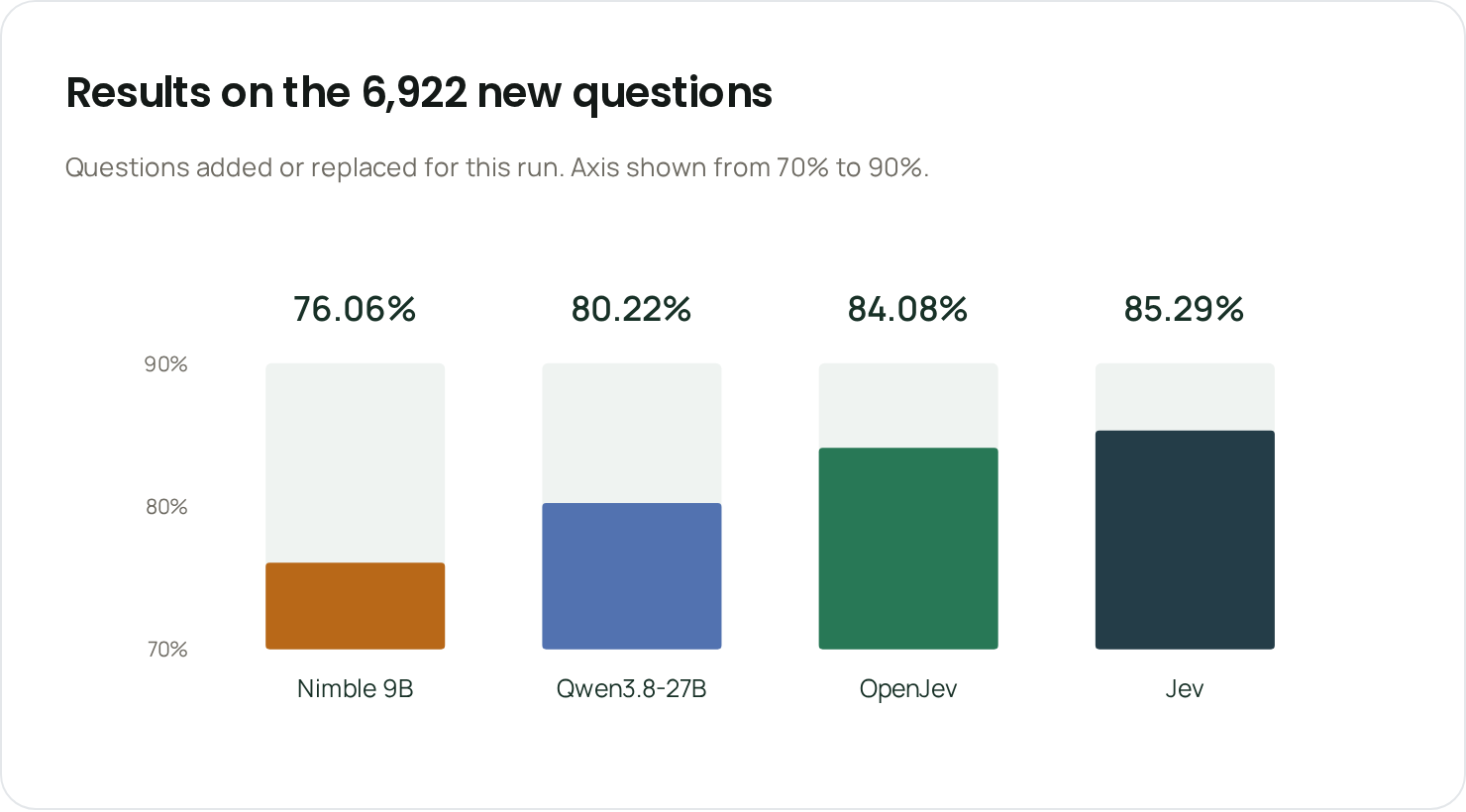
Of the 10,000 questions, 6,922 were added for this run and have no match in our training data or earlier evaluations. On those, OpenJev scored 84.08%, the base model 80.22%, Nimble 76.06% and Jev 85.29%.
OpenJev is ahead of Nimble in all eight question groups. Against Jev it leads on ethics and sentiment and ties on news and topics. Jev's biggest lead is science and facts, 89.02% to our 82.48%.
An independent benchmark of 14 open models by strata→signal (September 30) ranked OpenJev first on its hardest question set, with 101 of 108 right against 72 for the next open decision model.
Handling screenshots
One endpoint takes page text, a screenshot or both, plus the allowed options. On 975 steps from websites it never saw, OpenJev reads the screenshot and picks the right next action 87.4% of the time, against 68.5% for the base model given the same screenshots. Jev doesn't take screenshots.
Completing browser tasks
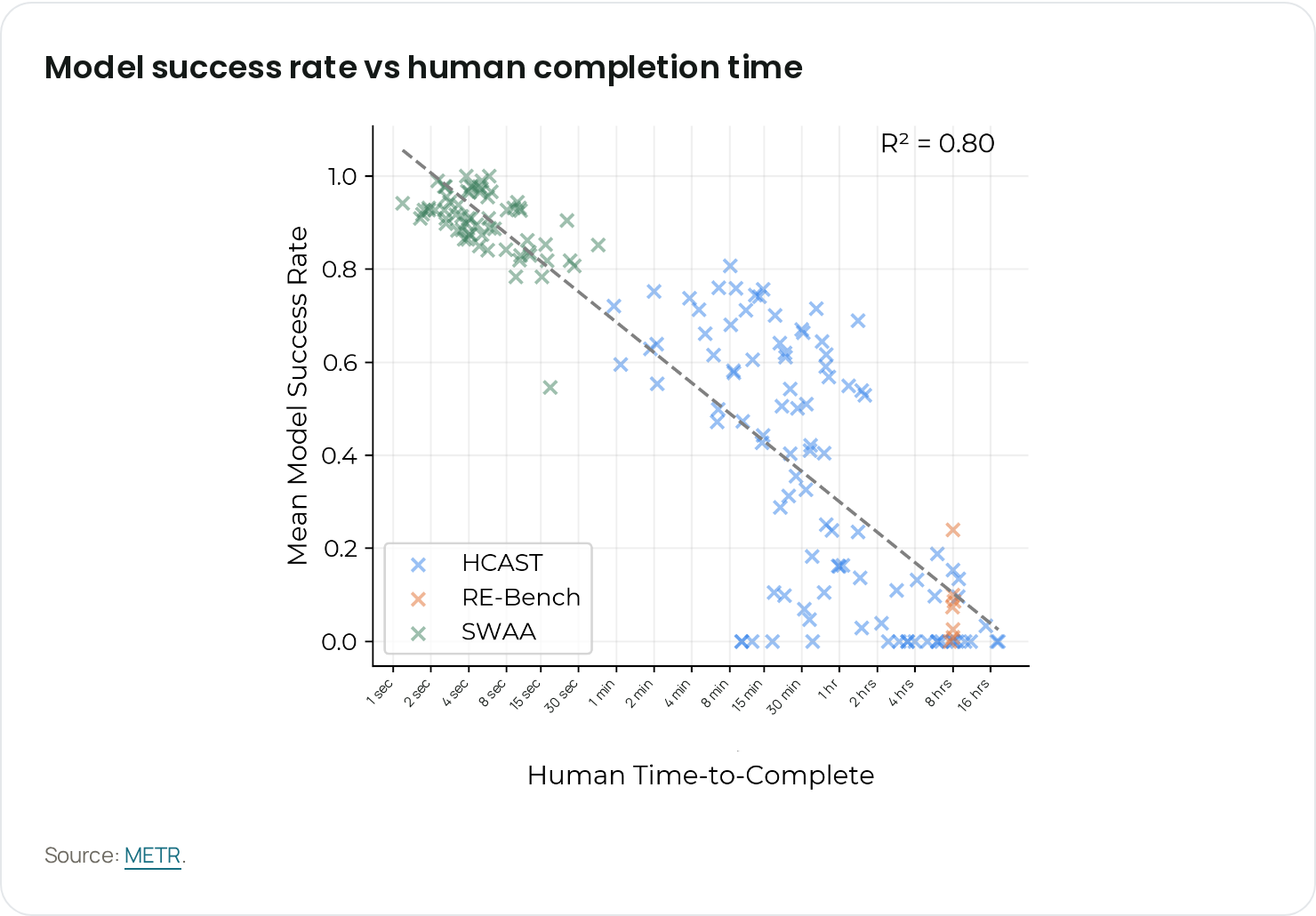
Agents make many decisions in a row, and small accuracy gains on each step add up over a long task. METR found that agents finish short software tasks far more often than long ones. So we also tested whole browser tasks, where the model has to handle pages changing and stop when the task is done.
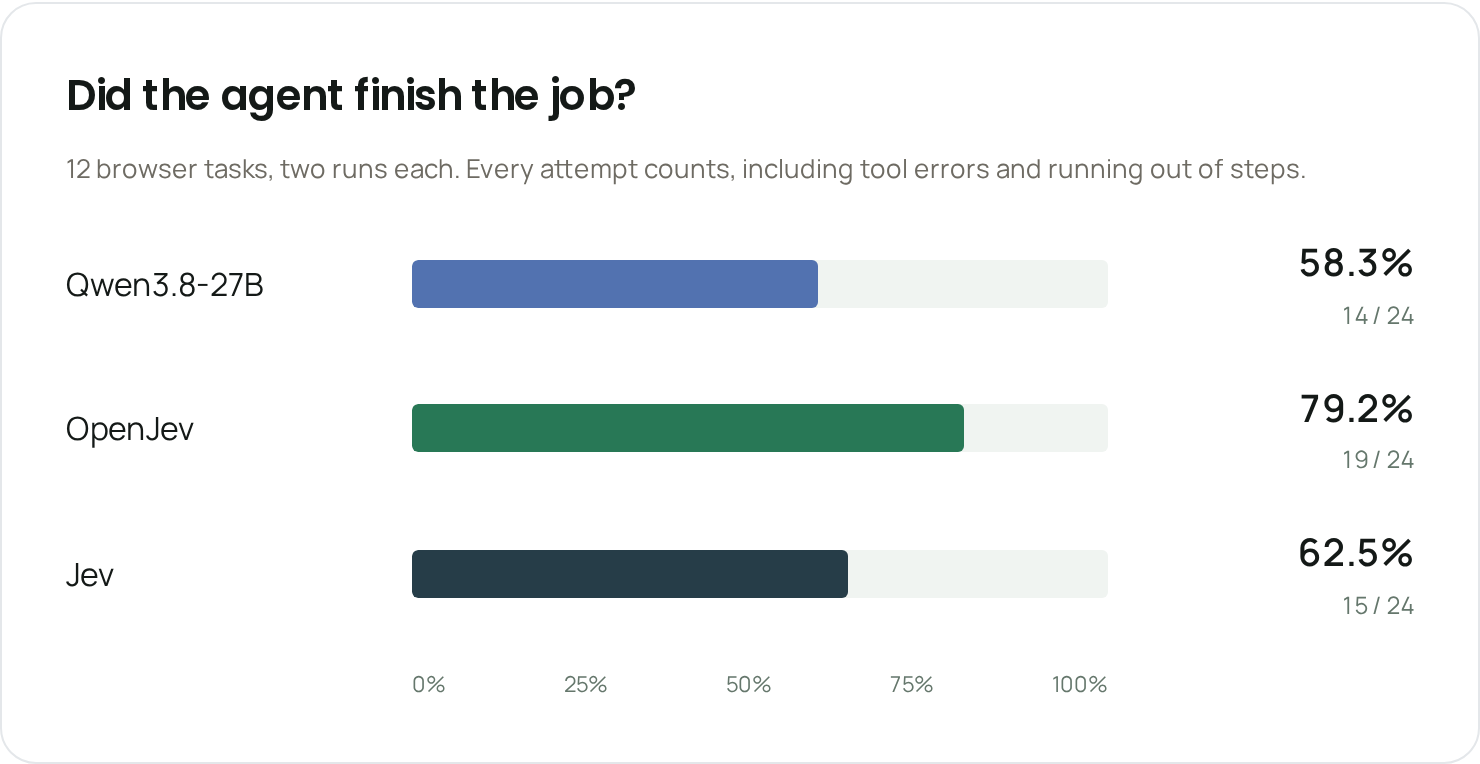
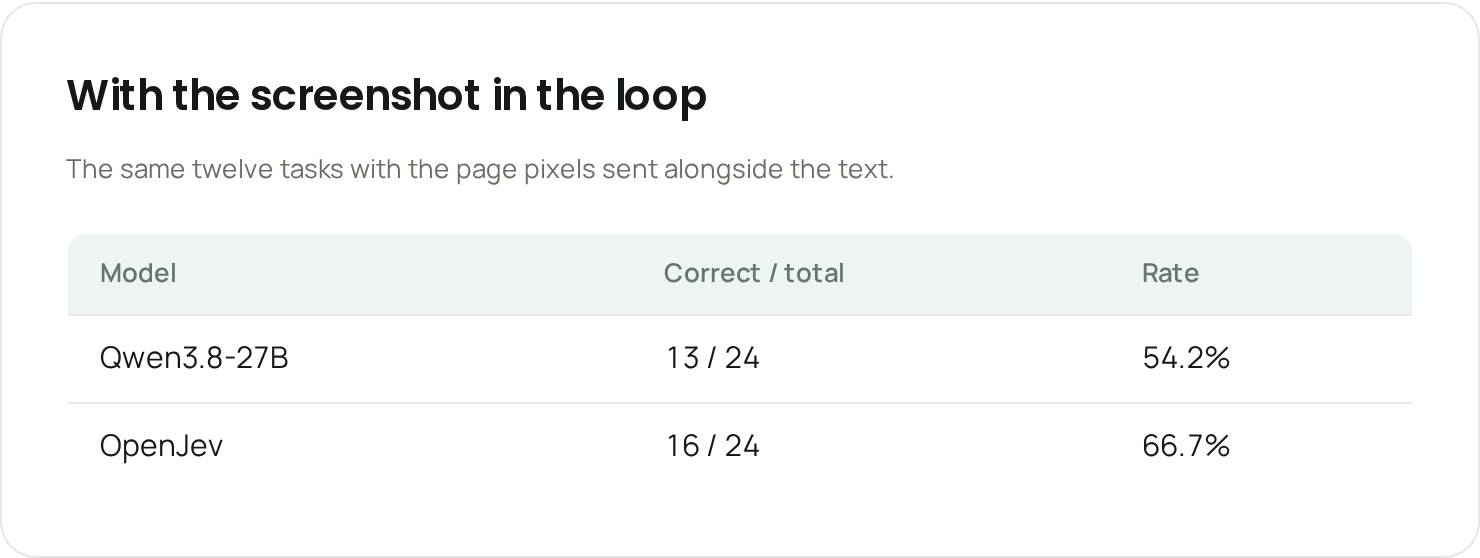
Every attempt counts, including tool errors and running out of steps. Screenshots helped most on single steps; on whole tasks, at 24 attempts each, the gap between text and screenshot runs is within noise. On a larger set of 100 synthetic browser tasks, OpenJev and Jev completed 39 each and the base model 38.
Matching results 23.4 seconds after the page loaded, in 10 browser actions. Page text mode, real footage at normal speed.
Filter to Apple and add the exact iPhone 12 in 2.8 seconds, with two browser actions. Real footage, checkout never opened.
12 successful runs selected from 16 recorded attempts, played together at normal speed. PASS means an automated check confirmed the final page.
Try OpenJev
Five builds are on Hugging Face:
- openjev/openjev: full 16-bit weights
- openjev/openjev-FP8: one H100 with vLLM
- openjev/openjev-MLX: 8-bit for Apple silicon Macs
- openjev/openjev-MLX-4bit: half the size of the 8-bit build
- openjev/openjev-GGUF: Q4_K_M, Q5_K_M, Q6_K and Q8_0 for llama.cpp, 16.5 to 28.6 GB
The weights are released under CC BY-NC 4.0 for research and other non-commercial use. For a commercial license, email support@loopai.com.
OpenJev is an independent project, not affiliated with TypeSafe. Jev is TypeSafe's product.
What's next
OpenJev is our first step toward small, fast models trained on Loop's own work. Next come models that find the right context for our agents, operate restaurant software through its screens, and learn skills like reconciliation directly, along with benchmarks on Loop's own back-office tasks.
If you want to work on problems like these, reach out to us directly at research@loopai.com.